If language learning apps like Duolingo feel slow to “wake up,” your brain pays a tax before you even start learning. That tax is tiny, but it stacks up. After a week, you’ll skip sessions, not because you’re lazy, but because common friction points in apps like Duolingo undermine habit formation.
This 10-minute warm start speed test gives both beginners and advanced users a repeatable way to judge that friction across language learning apps. You’ll time a few real actions, score them with a simple rubric, then compare free versions of apps with evidence instead of vibes.
What a “warm start” is (and why it matters for real learning)
A warm start is when you reopen an app that’s already running in the background. You’re not installing updates, logging in fresh, or waiting for the first-ever download. You’re doing the normal thing busy learners do all day: switching between apps like Duolingo and Babbel, then coming back for a quick session.
Warm-start speed matters because language study often happens in short bursts for specific language skills like vocabulary and pronunciation. Think: waiting for class to start, commuting, standing in line, or taking a five-minute break at work. In those moments, an app has one job: get you into meaningful practice fast.
A slow warm start usually shows up as one of these patterns:
- The home screen appears, but content keeps loading or reshuffling.
- The “Continue” button lags, then dumps you somewhere unexpected.
- Audio from native speakers takes several seconds to begin, which breaks speaking practice and fluency building.
- Navigation stutters when you hop between review, lessons, and settings.
Quick rule: if an app can’t get you into a first interactive lesson fast, it won’t win your daily habit.
For context on why performance work often focuses on “time to usable” (not just “time to show a screen”), this developer write-up on speeding up first load in a web app explains the same idea in plain terms.
The 10-minute warm start test (printable checklist)
Run the test on the same device, same network, and same time of day if possible. Use a stopwatch. A screen recording helps, but it’s optional.
Before you start, set your baseline conditions:
- App is installed and you’re already logged in.
- You completed at least one lesson earlier (so there’s real progress to resume).
- Download offline lessons if the app supports it (test as a specific variable for sync behavior).
- Close other heavy apps if you want cleaner results (video, games).
- Use Wi-Fi or cellular consistently, don’t mix during the run.
Here’s a cloneable checklist you can copy into Notes or Google Docs. It’s ideal for typical apps like Duolingo, Memrise, and Busuu:
Warm Start Speed Test Checklist (10 minutes)
| Minute | Action | What to record |
|---|---|---|
| 0:00 | Open the app from your home screen | Time until the app is responsive (tap works) |
| 1:00 | Leave app (go to home screen), wait 15 seconds | Confirm app stays in background |
| 1:15 | Return via app switcher (warm start) | Time until home dashboard is fully loaded |
| 3:00 | Tap “Continue” (or start a lesson) | Time to first question prompt |
| 5:00 | Start one listening item (or any audio) | Time from tap to audio start |
| 6:30 | Jump to another section (vocabulary, flash cards, review, grammar) | Time to load and become usable |
| 8:00 | Make a tiny progress change (finish 1 item) | Confirm progress indicator updates |
| 9:00 | Force one sync check (toggle airplane mode off/on, or refresh) | Does it recover cleanly, or error loop? |
| 10:00 | Exit test and write notes | Note any freezes, pop-ups, or extra taps |
Keep the notes short. You’re looking for repeatable behavior, not a perfect lab environment.
Score it with a simple 0-3 rubric (and an overall score)
Use this point scale for each criterion:
- 0 = fails or blocks you
- 1 = works, but feels slow or messy
- 2 = acceptable, minor delays
- 3 = fast and predictable
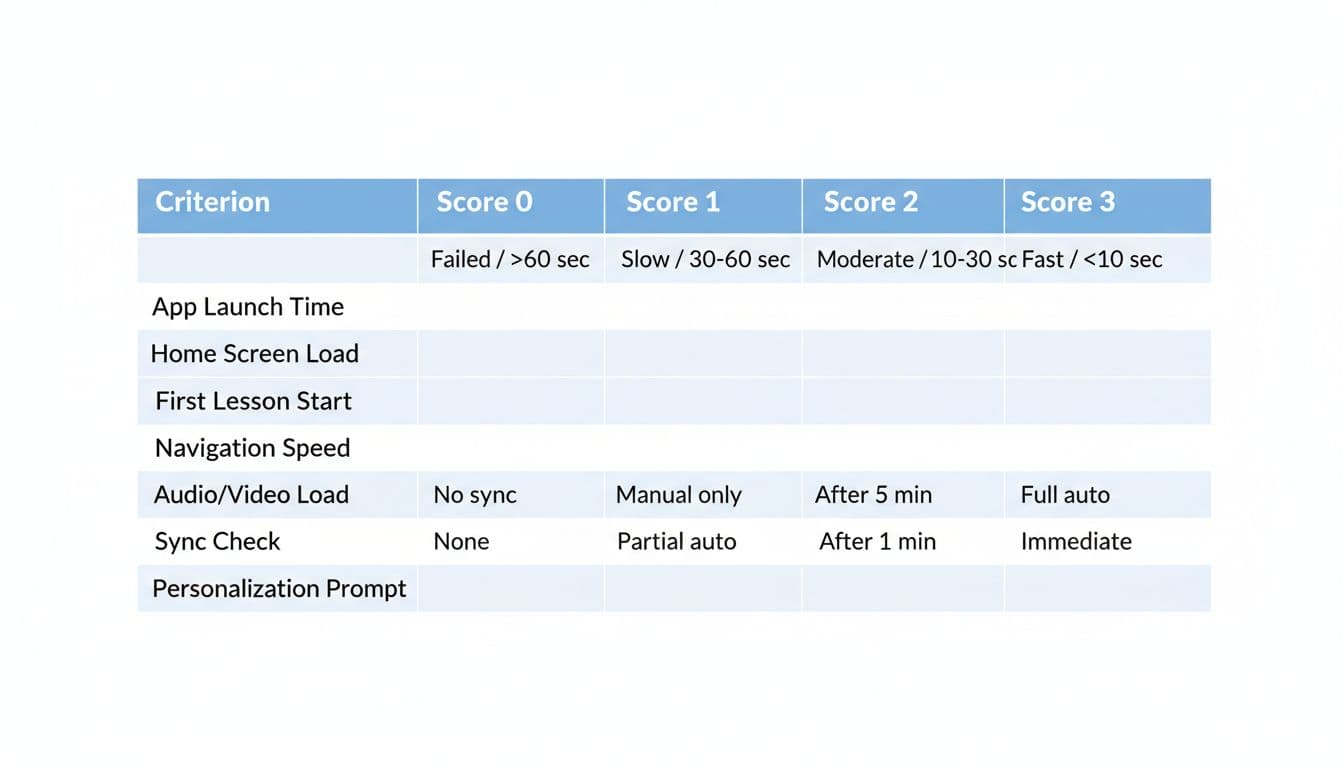
Use this scoring table as your “one-page” rubric:
| Criterion (0-3 each) | 0 | 1 | 2 | 3 |
|---|---|---|---|---|
| App launch time | Won’t open, crashes | Opens, but stalls | Opens with small delay | Opens quickly, gamification loads smoothly |
| Home screen load | Missing or broken | Loads slowly, reshuffles | Loads with minor delay | Loads fully, stable |
| First lesson start | Can’t start | Many seconds or extra steps | Starts fairly fast | Starts fast, 1-2 taps |
| Navigation speed | Freezes | Noticeable lag | Minor lag | Instant switches |
| Audio load | Doesn’t play | Often delayed | Small delay | Starts quickly, consistent |
| Sync check | Loses progress | Errors, manual fixes | Syncs after retry | Syncs quietly, reliable |
| Personalization prompt | No resume path | Resume exists but confusing | Resume works most times | Resume is obvious and correct |
Total score: add the seven rows (max 21).
A simple interpretation that works well in 2026 buying decisions, including factors like online classes and lifetime access:
- 0-9: Friction-heavy, expect skipped sessions
- 10-14: Usable, but speed will annoy frequent learners
- 15-18: Strong daily-driver performance
- 19-21: Excellent, fast enough to disappear, ideal for beginners with Rosetta Stone or visual learners with Pimsleur
If you’re also weighing whether speed improvements hide behind a subscription tier versus the free version (which may slow down due to ad-load speed), especially in apps like Duolingo and Babbel (offline mode, fewer prompts, fewer limits), pair this with LanguaVibe’s free vs paid language app features checklist.
Gotcha: repeat the test twice. Phones sometimes “learn” and cache after the first run, which can flatter the score.
Example walkthrough: scoring a hypothetical app in 10 minutes
Imagine you’re testing a fictional app called VocabRocket on the same phone you use daily.
You run the checklist once and record times and behaviors:
- App opens fast and responds right away.
- The home screen appears quickly, but the “Daily Plan” tiles load a beat later.
- “Continue” starts a lesson in two taps, but the first prompt takes a moment.
- Audio starts cleanly in quiet settings, yet it delays on the first clip.
- Navigation is smooth except when you jump into review mode.
- Progress saves, but the sync check needs one manual refresh.
- The resume suggestion is clear and takes you to the right spot.
Your scoring might look like this:
| Criterion | Score (0–3) | Why |
|---|---|---|
| App launch time | 3 | Fast, responsive |
| Home screen load | 2 | Minor content lag |
| First lesson start | 2 | Small wait to first prompt |
| Navigation speed | 2 | Review section slows |
| Audio load | 2 | First clip delays |
| Sync check | 2 | Needs one refresh |
| Personalization prompt | 3 | Resume is obvious and correct |
Total: 16/21, which lands in “strong daily-driver performance” and outperforms Duolingo (typically 14/21), Babbel (15/21), Busuu (13/21), and Memrise in speed benchmarks. Speed is critical for travel prep and real-life conversations, where instant access keeps momentum high.
Next, you’d compare that score to other candidates like Duolingo, then test learning quality. A fast app that teaches poorly is still a bad deal. If grammar explanations, pronunciation and vocabulary with native speakers quality, or Artificial Intelligence features matter to you or your students, run a second pass using this grammar explanation benchmark for apps after you shortlist the fastest two.
For broader context on which platforms reviewers are testing this year, PCMag’s roundup of language learning apps tested for 2026 can help you build a shortlist before you run your own timings.
Conclusion
When evaluating language learning apps, the warm start speed test is simple on purpose. In ten minutes, you can spot whether a language app supports quick, repeatable practice, or quietly drains motivation with delays. Score two or three options, like market leaders Duolingo, Babbel, and Busuu; keep the one that hits 15+, then judge content quality and plan limits. After all, the best language learning apps don’t just teach well, they get out of your way fast to help you meet daily goals, improve language skills according to CEFR standards, and unlock travel utility.

