
A language app can look polished and still be stuck in time, like a textbook that never gets a new edition. You pay, you commit, then you notice the same examples, the same audio quirks, and the same “new” lessons that aren’t new at all.
This 10-minute content freshness check helps you spot whether an app is actively maintained or quietly coasting. It’s written for buyers, parents, and educators who want language app updates that improve learning, not just subscription revenue.
Use it before you subscribe, and again every few months if you’re already paying.
| Time | What you’re checking | What “fresh” looks like |
|---|---|---|
| Minutes 0 to 3 | App store signals | Recent updates, meaningful notes, ongoing compatibility |
| Minutes 3 to 8 | In-app signals | New or revised lessons, improved audio, visible iteration |
| Minutes 8 to 10 | Support and community signals | Responsive support, clear policies, proof of ongoing work |
Minutes 0 to 3: App store signals that reveal real language app updates
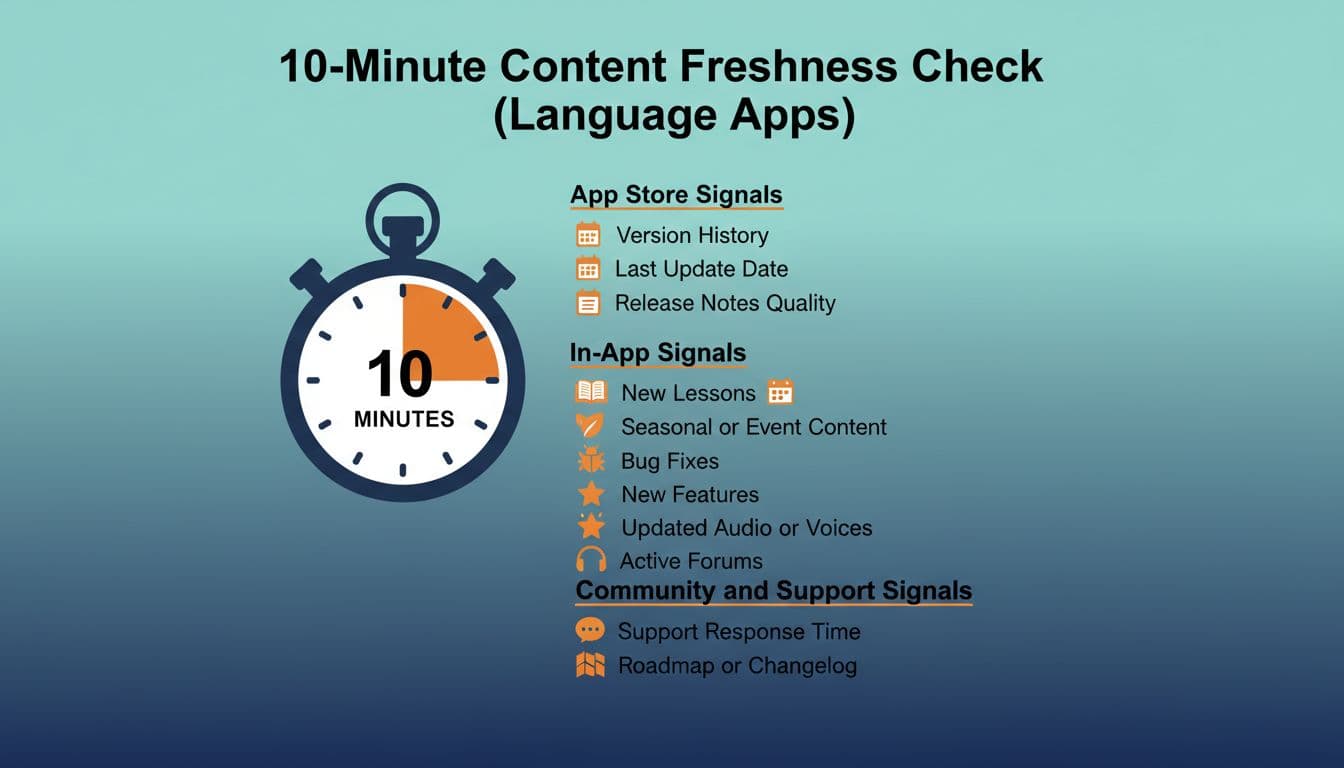
Start where the receipts live: the App Store or Google Play listing. You’re not just looking for a “Last updated” date. You’re looking for a pattern.
Version history cadence matters. An app that updates every few weeks or monthly is usually fixing bugs, keeping up with OS changes, and iterating on learning features. Long gaps aren’t always bad (some teams batch releases), but a long gap plus user complaints is a red flag.
Read the release notes like a skeptical shopper. If you see “bug fixes and improvements” for months, with no detail, it can mean one of two things: a mature product with boring maintenance, or a team doing the minimum while the course content stays stale. The difference shows up when you compare notes across time. Do they ever mention course revisions, new lessons, audio improvements, or better placement tests? Or is it always vague?
Check for platform compatibility signals. On iOS, look at the “Requires iOS” line. On Android, check supported versions and device notes. Apps that fall behind on compatibility can become glitchy after major OS updates, which often shows up as recent reviews mentioning crashes, login failures, or audio not playing.
Finally, scan the most recent 20 to 30 reviews, not the top reviews. You’re hunting for recurring phrases like:
- “same lessons as last year”
- “audio hasn’t changed”
- “support never replies”
- “lesson path reset and no explanation”
One or two complaints happen everywhere. A repeating theme is what matters.
If you want a reality check on how quickly “good enough” apps can stall once progress slows, this discussion of language apps that don’t plateau is a useful reminder to look for ongoing iteration, not just a big launch.
Minutes 3 to 8: In-app signs the lessons are being refreshed (not just repackaged)
Now open the app and act like a tester, not a student. Your goal is to find proof that the content team is still working.
First, look for recent course revisions inside the learning path. Some apps quietly update early units, swap examples, or re-record audio, and only heavy users notice. A positive sign is when an app labels revised units, highlights “updated” content, or explains why something changed (better alignment, clearer grammar sequencing, improved speaking prompts).
Second, check audio and speaking practice quality. Stale apps often have audio that feels uneven, robotic in one unit, and natural in another, because it was recorded years apart or stitched together. Fresh updates tend to show consistency: similar pacing, clearer pronunciation models, and fewer mismatched voices. If an app has speaking tasks, try three in a row. Do the prompts feel modern and relevant, or like a time capsule (“fax,” “DVD,” or awkward travel dialogues that no one uses)?
Third, look for new modes that change learning, not just cosmetics. A new widget, new badges, or a redesigned home screen can be fine, but it doesn’t prove learning content is improving. What does count: new listening formats, better placement, improved feedback, more realistic conversation tasks, or expanded levels.
You don’t need to take a company’s word for it. Many teams publish public updates you can compare against what you see in the app. For example, Duolingo has documented ongoing feature and course changes in posts like 2025 Duolingo highlights, which gives you a baseline for what “active development” communication looks like. Another example of a company explaining direction and product shifts is Memrise’s post on changes to the Memrise app. You’re not judging whether you like their choices, you’re checking whether they explain them clearly.
If you’re comparing two big-name apps, it also helps to run a quick side-by-side on course depth and structure. This guide on Rosetta Stone vs Duolingo: detailed comparison can help you spot when “freshness” is mostly UI polish versus real curriculum work.
Minutes 8 to 10: Community and support signals that predict whether an app will keep improving
The fastest way to get burned by a subscription is to assume support doesn’t matter until something breaks. In practice, support behavior is often the best predictor of future quality, especially for parents and schools managing multiple accounts.
Open the app’s Help or Contact section and look for basics:
- Is there a working support form, or only a dead FAQ?
- Are policies clear (billing, cancellations, classroom use, child accounts)?
- Do they acknowledge known issues, or pretend nothing’s wrong?
Then do one simple test: send a short question and see if you get a human reply in a reasonable time. You’re not trying to “catch” them. You’re checking if anyone is home.
Before you subscribe: a short decision flow
- If the last meaningful update was over 90 days ago, and reviews mention the same bugs repeatedly, pause and keep shopping.
- If updates are frequent but vague, open the app and verify real lesson changes (new units, revised audio, improved feedback).
- If the app’s content looks unchanged, but the price is premium, only subscribe if there’s a clear learning advantage you can name (teacher features, strong speaking feedback, great graded readers).
- If support is slow or unreachable, don’t commit to a long plan. Choose monthly until trust is earned.
One more buyer tip: niche areas tend to reveal freshness faster than general beginner courses. If a company maintains specialized training (like tone feedback or updated pronunciation drills), it’s a good sign they invest in content operations. For a concrete example of what “actively maintained” can look like in a focused category, see this roundup of top apps for mastering Mandarin tones in 2026.
A message you can send support (copy and personalize)
Hi, I’m considering a subscription and I’m trying to understand your update cadence.
- How often do you release lesson or course content updates for my target language(s)?
- Where can I see a changelog or release notes for content changes (not only bug fixes)?
- Are there any planned course revisions in the next 3 to 6 months (audio, speaking practice, CEFR alignment, new units)?
- If I subscribe now, will my course path change during the term, and how do you handle that?
Thanks, I’m happy to share the language(s), level, and device if helpful.
Conclusion
In 2026, the best apps don’t just look busy, they show steady improvement you can verify. A quick check of version history, in-app lesson changes, and support behavior will tell you whether you’re buying into a living course or a museum exhibit.

