A lesson can look polished and still miss the point. When language app lesson goals are vague, teams can’t tell what the learner should do after 15 minutes, and the learner can’t tell either.
This quick check helps product, curriculum, and learning teams review one lesson at a time. In a short audit, you can tell whether a lesson teaches, practices, or assesses a skill, whether the activity matches the promise, and whether success is measurable.
Why fuzzy lesson goals break otherwise good lessons
Most lesson problems start with a simple mismatch. The screen says “speaking practice,” but the task is tap-to-match. The lesson claims “master past tense,” but it only shows two examples and moves on. Busy isn’t the same as useful.
Clear goals act like lane lines on a road. Without them, vocabulary lessons drift into trivia, grammar drills turn into guessing, and review sessions repeat items without a clear reason.
Use this simple distinction during audits:
- Teach: the lesson introduces a new word, pattern, or rule with support.
- Practice: the learner uses that target with prompts, cues, or limited help.
- Assess: the learner performs with little support, and the app judges success.
That label matters because each one calls for a different task. A speaking assessment needs spoken output. A listening lesson needs audio that tests meaning, not only word spotting. A review lesson should retrieve earlier material, not re-teach it by accident.
If your wider course path also feels loose, pair this check with a 12-minute syllabus check to see whether lessons build in a sensible order. For teams refining lesson wording, this guidance on writing a language objective is useful because it keeps the focus on what learners can actually do.

Run the 15-minute goal clarity check
Pick one lesson, not a whole unit. Then review it from the learner’s point of view, but score it like a designer.
- Read the goal in plain language. If the lesson goal can’t fit one sentence, it’s too foggy. “Use five travel phrases to ask for help at a station” works. “Improve communication skills” doesn’t.
- Name the skill and lesson role. Is this teaching, practice, or assessment? A grammar drill with hints teaches or practices. A no-help speaking prompt assesses.
- Check the learner action. What must the learner actually do, type, say, choose, listen for, or recall? The action should match the goal.
- Look for a success rule. You need an observable outcome, such as “answer 4 of 5 correctly” or “say a complete sentence using the target pattern.”
This quick table helps teams score a lesson fast.
| Check | Pass signal | Red flag |
|---|---|---|
| Goal wording | Names skill, target, and context | Uses broad verbs like learn or improve |
| Task match | Activity uses the same skill as the goal | Speaking goal, but only tapping |
| Support level | Clear teach, practice, or assess role | Mixed supports with no purpose |
| Measure | Success is visible and countable | No clear finish line |
If a lesson passes three or four rows, it’s probably usable. If it fails two, rewrite before you polish copy or visuals.
For example, a vocabulary lesson that asks learners to match fruit words may teach recognition, but it doesn’t assess recall. A listening lesson that replays audio until the transcript appears may practice support use, not listening accuracy. Teams that want a second signal can pair this with the 10-minute lesson resume test to see whether the same goal still holds after a short break.
Short lessons work best when outcomes are concrete and visible. This overview of best practices and tangible outcomes for app-based English learning makes the same point from the learner side.
Rewrite vague goals into usable lesson goals
Most teams don’t have a content problem. They have a wording problem, then an activity problem. The fix is simple: write the goal so a stranger can picture the learner action.
Use this formula: verb + language target + context + success measure.
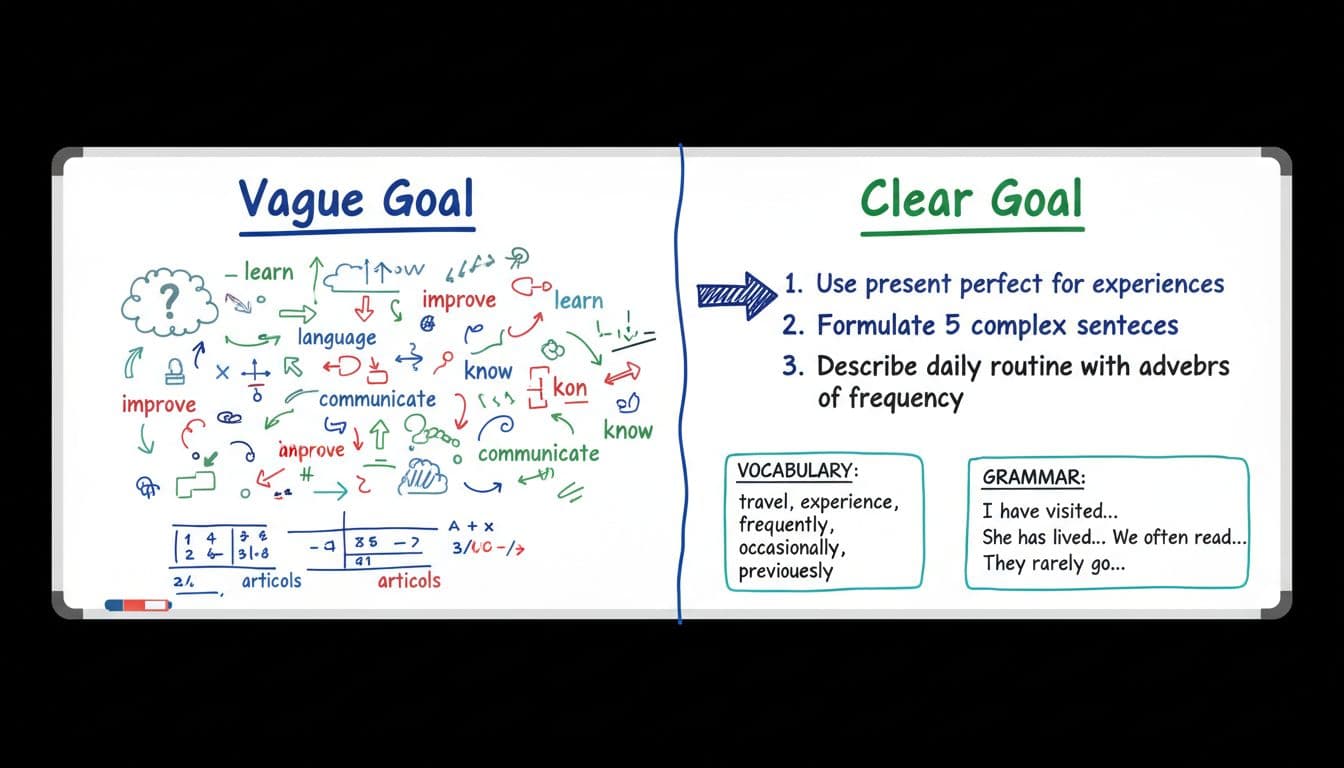
Here are a few fast rewrites teams can use:
- Vocabulary lesson: “Learn food words” becomes “Use 10 food words to order a simple meal.”
- Grammar drill: “Practice past tense” becomes “Write and say five short sentences about yesterday using regular past tense verbs.”
- Speaking practice: “Improve pronunciation” becomes “Say eight travel phrases clearly enough to pass the speech check in 6 of 8 tries.”
- Listening exercise: “Understand a dialogue” becomes “Identify the main request and two details in a 30-second hotel check-in audio.”
- Review session: “Review Unit 3” becomes “Recall 12 missed items from Unit 3, then use six in new sentences without hints.”
Fix the activity after you fix the goal
Once the goal is clear, the task usually tells you what’s wrong. If the goal is spoken output, remove word-bank dependence and ask for full speech. If the goal is grammar practice, add sentence creation, not only error spotting. If the goal is assessment, reduce hints and model answers.
This is where many language app lesson goals fall apart. A lesson says it measures skill, but its supports still do the work. If hints reveal the answer, the task may teach or scaffold, but it doesn’t assess. For that problem, a quick hints quality test for apps can show whether support helps learning or simply gives answers.
Teams should also track one clean outcome per lesson in analytics, because completion alone hides weak design. When the goal is clear, the data gets clearer too.
A lesson with no clear goal is like a workout with no target muscle. You can spend energy and still miss progress. Before your next release, run this 15-minute check on one vocabulary lesson, one grammar drill, and one speaking task. Clarity makes every later choice easier, from activity design to scoring to review.

