
You open a language app and it feels fun, fast, and oddly satisfying. Then, three weeks later, you realize you’ve learned “airport,” “octopus,” and “grandmother’s hat,” but you still can’t introduce yourself without freezing.
That’s usually a structure problem, not a motivation problem. A real language app syllabus gives you a path, not just content.
This 12-minute “course map” check helps you tell if an app has an actual syllabus (with progression and review), or if it’s mostly random lessons dressed up as learning.
The 12-minute course map check (what to do, where to look)
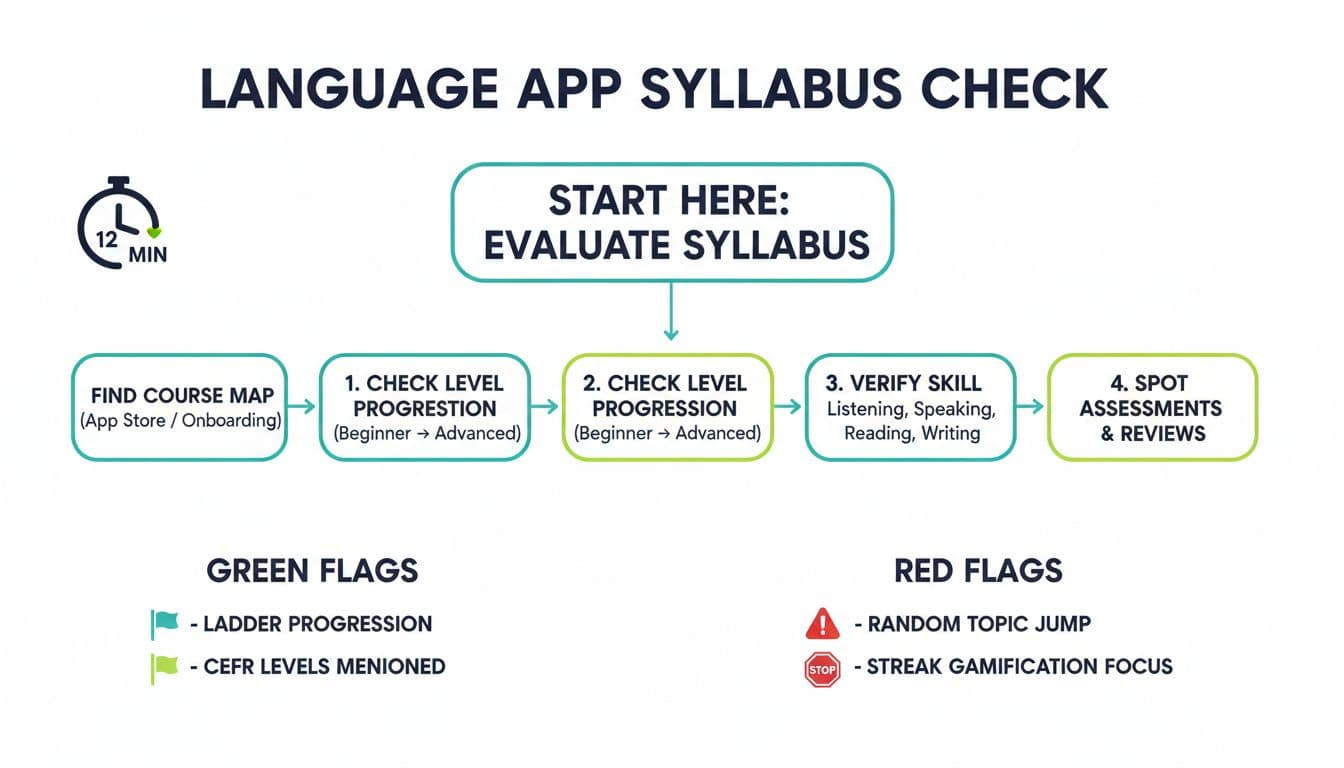
Think of a good app like a well-labeled subway line. You should see stops, transfers, and where the line ends. A random app is more like a pile of postcards. Interesting, but it’s hard to build a city map from them.
Here’s a quick, practical way to inspect structure without doing a deep trial:
Minutes 0–3: Check the app store page
Look at screenshots and the description. Do they show a “course,” “units,” “levels,” or a clear sequence? If the screenshots only show streaks, leaderboards, or topic tiles (Food, Travel, Flirting), that’s a warning sign. Also scan reviews for phrases like “no structure,” “repeats,” or “can’t find where to start.”Minutes 3–6: Scan onboarding
Install and start. A syllabus-based app often asks your level or offers a placement check. Even a simple “I’m new vs I know some” is better than nothing. If onboarding pushes you straight into a daily feed with no choice of level, you may be in content-binge territory.Minutes 6–9: Open the course map (or try to)
Look for tabs like Path, Course, Units, Levels, Curriculum, or Syllabus. If you can’t find a map, open Settings, Help, or FAQ and search for “levels” or “CEFR.” A real syllabus is usually proud enough to be visible.Minutes 9–12: Open lesson 1 and lesson 10
You’re checking sequencing. Does lesson 10 clearly build on lesson 1 (more grammar, longer sentences, more listening load), or does it just switch topics? If the difficulty feels random, the “course” might be a shuffle.
If you want a concrete example of what structured modules can look like, compare what you’re seeing to a structured-app breakdown like this Babbel review: pros, cons, and pricing, then check whether your app shows similar progression signals.
What counts as “real syllabus” evidence (and what doesn’t)
Apps use a lot of marketing words. “Personalized,” “AI-powered,” and “bite-sized” don’t tell you if there’s a plan. Evidence lives in the small details: labels, locked prerequisites, review cycles, and assessments.
A solid language app syllabus usually shows three things:
- Progression: You can predict what’s coming next.
- Coverage: It develops multiple skills, not just recognition.
- Verification: It checks what you can do, not just what you tapped.
Use this table as your fast proof checklist while browsing screens, help pages, and early lessons:
| What to look for | Where you’ll usually find it | Why it matters |
|---|---|---|
| Course map with units and order | Home tab, “Path,” “Units,” screenshots | Shows the app isn’t a random lesson library |
| Level labels (A1, A2, B1) or clear beginner to intermediate stages | Course map, FAQ, onboarding | Helps you avoid being placed too high or too low |
| “Can do” outcomes (ex: “Order food,” “Introduce yourself”) tied to levels | Unit headers, lesson goals | Outcomes keep lessons connected to real use |
| Spaced review or a review manager | Practice tab, review settings | Prevents forgetting and reduces constant re-learning |
| Placement check or diagnostic | Onboarding, settings | Saves time and lowers frustration for teens and busy adults |
| Mixed skill tasks (listening + speaking + reading + short writing) | First 2–3 lessons | A syllabus builds ability, not just vocabulary lists |
| Periodic checkpoints (unit tests, mastery checks) | End of unit, progress screen | Confirms progress and exposes weak points early |
If an app references CEFR, treat that as a claim you can verify. CEFR levels have defined skill expectations, not just a vibe. The Council of Europe maintains official materials, including CEFR tools for curricula, which can help you understand what “A2” should roughly include.
Also pay attention to “gates.” A course with prerequisites (finish Unit 1 before Unit 2) often signals intentional sequencing. A fully open buffet of lessons can still be high quality, but it puts the burden of planning on you.
Common traps: random topic packs, endless feeds, streak-first design
Some apps aren’t “bad,” they’re just built for browsing, not building. The trap is thinking that activity equals progress.
Random topic packs are the most common issue. You’ll see bundles like “Travel,” “Dating,” “Business,” each with short lessons you can do in any order. That can help with quick prep, but it often skips core sequencing (pronouns before verb endings, basic sentence patterns before fast dialogues). You end up with holes that show up in speaking.
Endless feeds feel modern, but they can quietly remove the idea of a finish line. If the app can’t tell you what “done with beginner” looks like, it’s hard to measure progress, and easy to churn.
Streak-first design is the sneakiest. Streaks can help you show up, and showing up matters. The problem is when streaks replace teaching: the app rewards you for any tap, even if you’re stuck repeating the same easy prompts.
To separate gamification from pedagogy, look for one simple signal: when you miss an item, does the app route you into targeted review, or does it just move on? Real teaching reacts to errors. Pure gamification mostly reacts to time spent.
If you want a quick set of warning signs to compare against what you’re seeing, this post on warning signs of bad language apps is a useful sanity check. For a more research-oriented angle on what “effective” even means in this space, Michigan State’s piece on researching language app effectiveness gives helpful context.
A simple decision framework: subscribe, trial longer, or skip
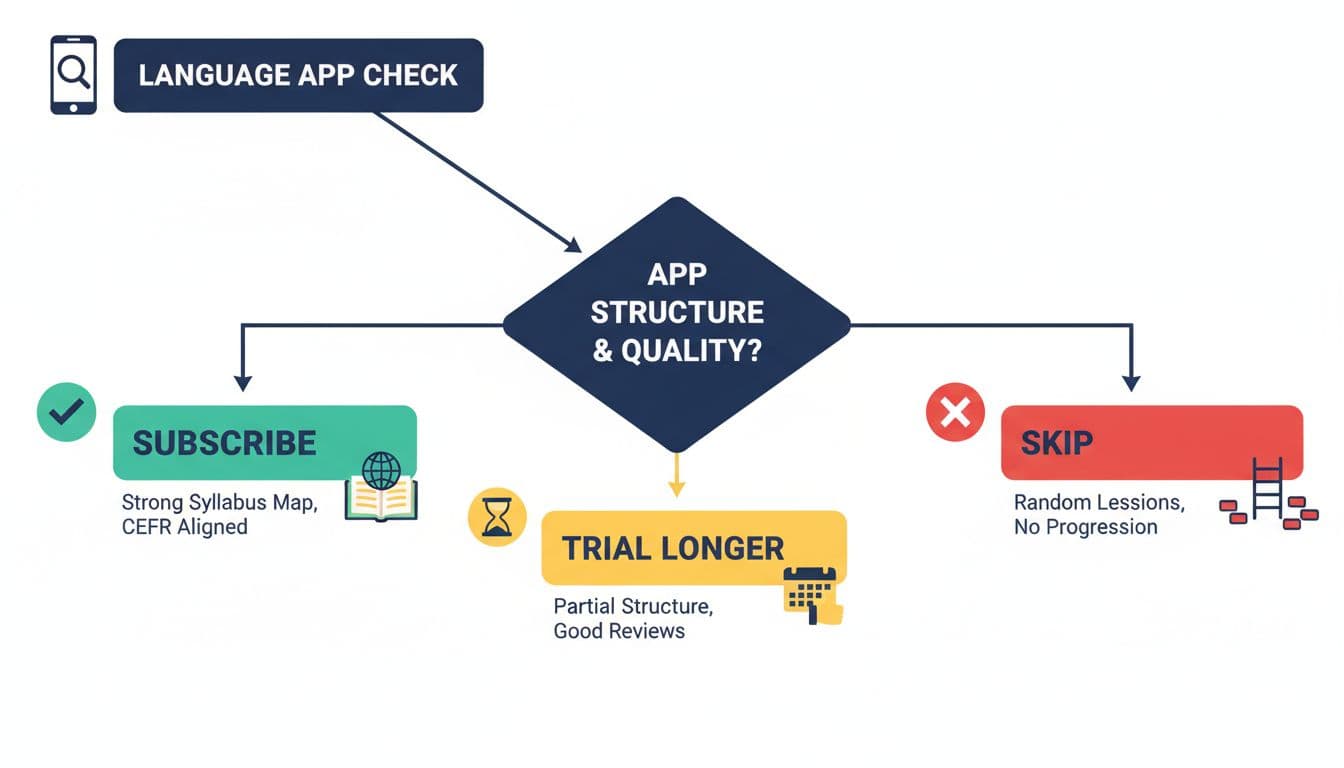
After your 12 minutes, make a call using what you actually saw, not what the app promised.
Subscribe when the course map is visible, levels are clear (even if they’re not CEFR), review is built-in, and early lessons show planned difficulty growth. This is a good fit for busy professionals who need a path they can follow without thinking.
Trial longer when the app shows some structure (units, review, goals) but you can’t confirm level depth yet, or speaking and writing practice looks thin. Give it 7–14 days and watch whether it introduces new sentence patterns, not just new words.
Skip when you can’t find any course map, lessons feel like interchangeable cards, and the main “progress” features are streaks and scrolling. Parents buying for teens should be extra strict here, teens often need structure more than choice.
Conclusion
A real syllabus makes learning feel steady, like walking up stairs instead of hopping between stepping stones. The 12-minute course map check helps you spot structure fast, using evidence on the store page, onboarding, early lessons, and help screens. If you can’t find a clear language app syllabus in plain sight, you’ll end up doing the planning work the app should’ve done. Pick the app that shows you the route, then spend your time practicing, not guessing.
Ready to Take Your Language Learning Further?
Your favorite language-learning app is a great place to start. Rocket Languages can help you go further with interactive audio lessons, pronunciation practice, real-world conversations, and structured learning.
Explore Rocket Languages →Affiliate disclosure: We may earn a commission if you purchase through this link, at no additional cost to you.
