
A hands-on review for intermediate and advanced Japanese learners
Affiliate disclosure: This review contains affiliate links. Kikugo provided Languavibe with complimentary unlimited Pro access for testing. If you subscribe through one of our links, we may earn a commission at no additional cost to you. This partnership does not influence our independent opinions or recommendations.
Verdict: Kikugo does what it promises. During my test, I could click a Japanese Netflix subtitle, read an explanation of the sentence in context, review its vocabulary and grammar, and save the sentence for later study in Anki. It is a focused and useful immersion tool for learners who already understand kana and some basic Japanese. Complete beginners will probably need a structured course before they can get the most from it.
Kikugo at a Glance
| Category | Details |
| Best for | Intermediate to advanced Japanese learners and active immersion learners |
| Platform | Desktop Google Chrome |
| Content source | Netflix titles with Japanese subtitles |
| Main features | Click-to-explain subtitles, contextual meaning, vocabulary and grammar notes, saved cards, Anki and CSV export |
| Price | $10 per month or $72 per year |
| Free trial | 7 days with full access; payment card required |
| Main limitation | Netflix on desktop Chrome only at the time of review |
What Is Kikugo
Kikugo is a Chrome extension designed to help Japanese learners study directly from Japanese-subtitled programs on Netflix. Instead of showing a permanent English translation over the video, the extension waits until you select a subtitle. It then pauses the scene and opens a compact explanation panel.
The panel can show the sentence meaning, individual vocabulary, readings, grammar and usage notes. You can save useful lines and export your collection in an Anki-ready or CSV format. According to the official Kikugo website, the service currently works with Japanese subtitles on Netflix in desktop Chrome. It is not a complete Japanese course and does not replace Anki; it helps learners turn authentic sentences into review material.
How I Tested Kikugo
I installed Kikugo and used it while watching Japanese content on Netflix. My test focused on the two functions that matter most: whether the extension could explain a selected subtitle in its scene context and whether I could save the result as a study card.
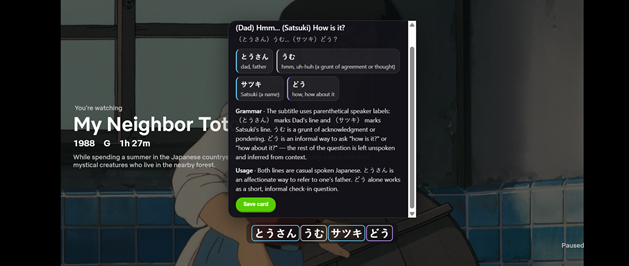
Kikugo explains the selected subtitle with vocabulary, grammar and usage notes.
The first test succeeded. After I clicked a subtitle, Kikugo displayed the whole-line meaning and separated important words into readable vocabulary blocks. It also explained why the short, casual sentence worked in that situation instead of providing only a literal word-for-word translation. That contextual layer is valuable because natural Japanese often omits information that listeners are expected to infer.
The second test also succeeded. I selected the save option and Kikugo confirmed that the sentence had been added to my deck. This removes several manual steps normally involved in sentence mining, such as copying the subtitle, finding readings, writing a definition and organizing the information for Anki.
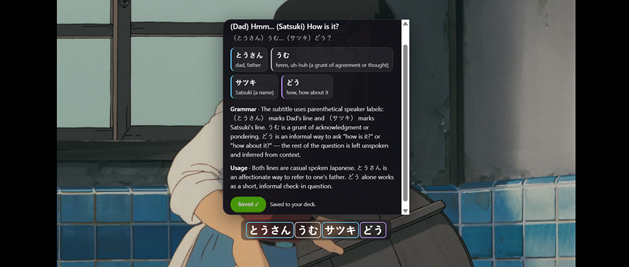
The saved confirmation shows that the selected sentence was added to the user’s deck.
How Kikugo Works
- Install the Kikugo extension in desktop Chrome and create an account.
- Open a Netflix program that offers Japanese subtitles.
- Click a subtitle line you want to understand. The scene pauses while Kikugo opens its explanation.
- Review the contextual meaning, vocabulary, readings, grammar and usage notes.
- Save useful sentences to your deck, then export them for review in Anki or as a CSV file.
The workflow is deliberately narrow. Kikugo is designed for active immersion and sentence mining, not for passively translating every line. Because the panel appears only when requested, the show remains the main focus.
What Kikugo Does Well
Explains the Whole Sentence in Context
A dictionary can define individual words, but natural dialogue also contains implied subjects, shortened expressions, casual speech and meaning created by the scene. In my test, Kikugo explained both vocabulary and how the sentence functioned in context. This made the selected line easier to understand than a simple translation alone would have.
Makes Sentence Mining Faster
Building useful flashcards manually can interrupt a viewing session. Kikugo combines the sentence, reading, meaning and notes in one workflow. The save function worked during testing, so I could capture a useful line without recreating the information in several separate tools.
Works With Anki Instead of Replacing It
Many serious language learners already have an Anki routine. Kikugo supports that routine by preparing material from sentences the learner personally encountered. This can make flashcards more memorable because each line is tied to a scene, character and situation.
Keeps the Interface Focused
The extension does not cover the entire video with permanent translations. Its explanation opens when you choose a subtitle and can be dismissed when you are ready to continue. This supports active learning without turning every viewing session into a lesson.
Who Should Use Kikugo
Kikugo is best suited to intermediate and advanced learners. It can also help motivated upper beginners who can already read hiragana and katakana and understand basic sentence structure. These learners are more likely to recognize what they know, notice what they missed and use the grammar explanation productively.
- Japanese learners who regularly watch anime, films or dramas with Japanese subtitles
- Anki users who want a faster sentence-mining workflow
- Learners who understand textbook Japanese but struggle with casual dialogue
- Independent learners who prefer authentic content to a fixed lesson sequence
Is Kikugo Suitable for Beginners
Kikugo is not the best primary resource for a complete beginner. It does not teach kana step by step, provide a structured grammar sequence or guide learners through a beginner curriculum. Native Netflix dialogue can also be fast and full of contractions, slang and omitted information.
A beginner could still experiment with the tool, but it would work better as a supplement to a structured Japanese course. Once the learner can read kana, recognize common vocabulary and understand basic grammar, Kikugo becomes much more practical. The extension’s own Chrome Web Store description similarly positions it as an immersion companion rather than a beginner course.
Kikugo Pricing
At the time of this review, Kikugo offers a 7-day free trial with full access. A payment card is required, and you must cancel before the trial ends to avoid being charged. After the trial, the monthly plan costs $10 per month. The annual plan costs $72 per year, which works out to $6 per month when paid yearly. Pricing and trial terms can change, so confirm the current details on the official Kikugo website before subscribing.
The annual plan provides the better value for regular users. However, the monthly plan may make more sense if you want to test whether sentence mining will become a consistent part of your study routine.
Kikugo Pros and Cons
| Pros | Cons |
| ✓ Contextual explanations rather than isolated definitions | • Not a structured course for complete beginners |
| ✓ Vocabulary, grammar and usage information in one panel | • Currently limited to Japanese Netflix on desktop Chrome |
| ✓ Fast saving and Anki-ready export | • Requires access to Netflix and compatible Japanese subtitles |
| ✓ Does not display a constant translation overlay | • Frequent pauses may disrupt relaxed viewing |
| ✓ Seven-day full-access trial | • Payment card required for the free trial |
Privacy and Practical Considerations
The Chrome Web Store listing states that the extension runs on Netflix, reads the subtitle selected by the user and does not sell data for unrelated purposes. The listing also discloses handling of personally identifiable information, authentication information and website content. Review the current privacy policy and Chrome permission request before installing, especially if you are cautious about extensions that operate on streaming sites.
Kikugo is not affiliated with Netflix or AnkiWeb. Availability can also depend on whether a particular Netflix title offers Japanese subtitles in your region. Check title compatibility and whether the workflow suits you during the 7-day trial.
Final Verdict
My hands-on test confirmed that Kikugo performs its two central jobs: it explains a selected Japanese subtitle in context and lets the learner save that material for Anki review. The interface makes authentic dialogue easier to study without forcing a permanent translation onto the screen.
I recommend Kikugo primarily to intermediate and advanced Japanese learners who already use immersion, Netflix or Anki. It is less suitable as a first learning resource for beginners, but it can become a useful companion once basic kana, vocabulary and grammar are in place.
Try Kikugo free for 7 days here.
A payment card is required. Cancel before the trial ends to avoid being charged.
Frequently Asked Questions
What is Kikugo?
Kikugo is a Chrome extension that explains Japanese Netflix subtitles and helps learners save selected sentences for Anki or CSV review.
Does Kikugo work without Netflix?
No. At the time of this review, Kikugo is designed for Japanese-subtitled content on Netflix in desktop Chrome.
Is Kikugo good for beginners?
It is better for intermediate and advanced learners. Upper beginners who can read kana and understand basic grammar may also benefit, but Kikugo is not a structured beginner course.
Can Kikugo export to Anki?
Yes. Kikugo lets users save selected sentences and export the prepared material in an Anki-ready format or CSV file.
How much does Kikugo cost?
At the time of review, Kikugo costs $10 per month or $72 per year. A 7-day full-access trial is available, but a payment card is required and you must cancel before the trial ends to avoid being charged.
Does Kikugo translate every subtitle automatically?
No. Kikugo is click-to-explain: you choose the subtitle you want to study, which helps keep the video itself in focus.
Ready to Take Your Language Learning Further?
Your favorite language-learning app is a great place to start. Rocket Languages can help you go further with interactive audio lessons, pronunciation practice, real-world conversations, and structured learning.
Explore Rocket Languages →Affiliate disclosure: We may earn a commission if you purchase through this link, at no additional cost to you.
